Under the hood — how this site is built
A tour of the static-first stack behind this personal site — Next.js, Notion, Azure Static Web Apps, and a build pipeline that bakes torn-paper PNGs at compile time.
This is the first real post on this site, and it felt only fair to make it about the site itself. The goal was simple: a small, fast, bilingual personal page I can write to from my phone, deploy for almost nothing, and never have to babysit.
Below is the shape of what ended up being built — what I picked, what I skipped, and a few of the tricks I'm quietly proud of.
The one-paragraph version
It's a fully static site exported by Next.js 14, hosted on Azure Static Web Apps. There is no server, no database, no API. Blog posts come from Notion at build time. Chinese posts are auto-translated into English by Azure OpenAI with a content-hash cache so I don't burn tokens on every build. Photos for the home collage are processed at compile time by sharp into PNGs with hand-rolled torn-paper edges. GitHub Actions glues it all together, and re-builds every six hours so freshly published Notion entries show up without anyone touching a commit.
Stack at a glance
| Layer | Choice |
|---|---|
| Framework | Next.js 14 (App Router, output: 'export') |
| Language | TypeScript + React 18 |
| Styling | Tailwind CSS with a small design-token palette |
| i18n | next-intl, route-prefixed (/en/… and /zh/…) |
| Theme | next-themes for dark/light |
| Blog content | Notion API + notion-to-md |
| Translation | Azure OpenAI (chat completions), cached on disk |
| Markdown → HTML | unified + remark + rehype + shiki for code highlighting |
| Image pipeline | sharp (build-time only) |
| 3D globe | react-globe.gl + three + topojson-client |
| Hosting / CDN | Azure Static Web Apps |
| CI/CD | GitHub Actions |
Everything that looks "dynamic" — the blog, the translations, the torn-paper photos — is actually frozen into static files at build time. The browser only ever sees plain HTML, JS, CSS, and PNGs.
The build pipeline
Every npm run build runs three scripts in sequence:
sync-notion.mjs— pulls every Notion page whoseStatusisPublished, converts the blocks to markdown, downloads any referenced images (Notion's signed URLs expire in an hour, so they have to be mirrored intopublic/blog/notion/), optionally translates Chinese posts into English via Azure OpenAI, then renders the markdown into HTML through a unified pipeline with shiki syntax highlighting. The result is one file:.cache/blog/posts.json.build-collage.mjs— scanspublic/collage/*.png, applies the torn-paper effect described below, and emits a typed TypeScript module with positions and sizes for every photo.next build— produces a staticout/tree withoutput: 'export',images.unoptimized: true(SWA doesn't run the Next image optimizer), andtrailingSlash: truefor friendlier URLs.
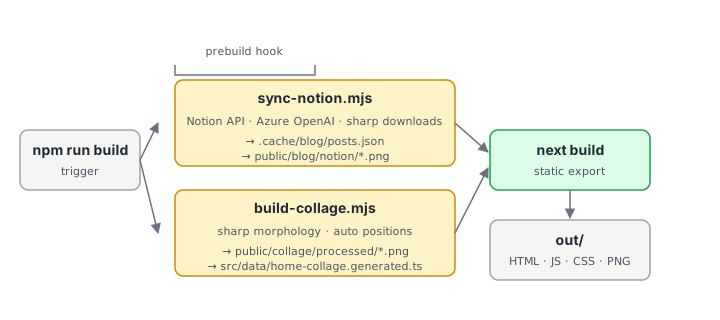
Pseudo-flow:
npm run build
  ├─ prebuild: sync-notion.mjs   →  .cache/blog/posts.json
  │                                public/blog/notion/*.png
  ├─ prebuild: build-collage.mjs →  public/collage/processed/*.png
  │                                src/data/home-collage.generated.ts
  └─ next build                  →  out/  (static HTML/JS/CSS)
Notion as a CMS, with a translation cache
Notion is fantastic for writing on a phone, terrible as a runtime dependency. The compromise: it's a runtime dependency of the build, not of the site.
When a Chinese post hasn't changed, I don't want to re-translate it on every
build (Azure OpenAI is metered per token). So sync-notion.mjs computes a
SHA-256 over title + excerpt + body and uses that as a cache key into
cache/translations.json, which is checked into git. Hit the cache and we
spend zero tokens. Miss it and we call the model, get back JSON with
{ title, excerpt, body }, and add it to the cache. The next CI run commits
the updated cache back to main so future builds are free again.
The model is prompted to keep markdown structure intact, not translate code or
URLs, and preserve the original voice. The output gets a small AI · EN badge
on the listing so readers know it's a translation.
Torn-paper photos, baked at compile time
The home page has a paper-collage hero — Polaroid-ish photos scattered on a warm beige background. The "torn-paper" edge (a soft cream rim feathering into the background) is generated entirely at build time so the browser does no image processing.
The algorithm uses sharp's morphological operations:
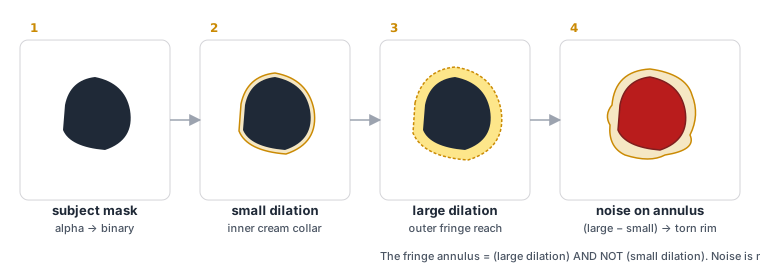
- Extract a binary mask of the photo's subject.
- Dilate the mask by a small radius — that gives the inner cream collar that hugs the subject.
- Dilate the mask by a larger radius — that gives the outer fringe, the maximum reach of the torn paper.
- The fringe annulus is
outer AND NOT inner. On just that ring, blend in a noise texture so the edge breaks up irregularly instead of being a smooth curve.
One footgun worth sharing: libvips (which sharp uses) has a pipeline optimizer
that can quietly reorder .blur().threshold() chains, breaking the effect. The
workaround was to run blur in sharp but do the thresholding in plain JS on the
raw pixel buffer. Same result, no surprise reorderings.
Auto-discovering photos with a quasi-random scatter
Editing a JSON file every time I drop a new photo into the collage got old fast.
So the script now treats the filesystem as the source of truth: every PNG
in public/collage/ shows up automatically, and slots.json is an optional
overrides file for pinning specific positions.
For default placement I want randomness that doesn't look random — no
clusters, no rows, no two photos overlapping in the same patch of canvas. The
trick is a low-discrepancy sequence based on the plastic constant. For each
photo index i, the default (x, y) is:
x = (i + 1) * 0.7548776662466927 mod 1
y = (i + 1) * 0.5698402909980532 mod 1
This spreads points across the unit square more evenly than uniform random sampling, with none of the diagonal-stripe artifacts you get from golden-ratio sequences in 2D. Then a per-file hash adds a small jitter so the layout still feels organic.
The same hash drives rotation (±20°) and z-index, so the same photo always lands in the same spot — deterministic, but visually unstructured.
To stop photos from overflowing the (narrow, fixed-width) right column on
desktop, the script also auto-clamps x based on each photo's actual rendered
width. Auto-positioned photos get silently moved inwards; manually pinned ones
just get a warning. Drop in a new image, run the script, done — no math, no
tweaking.
How a page actually loads
There's no server, so the runtime story is short:
- Browser hits the SWA CDN.
- next-intl middleware (resolved at the edge) redirects bare paths to
/en/or/zh/based onAccept-Language. - CDN returns the pre-rendered HTML for that locale.
- React hydrates and a handful of client components wake up — theme toggle, locale toggle, the lazy-loaded 3D globe.
- The browser pulls processed PNGs straight from the CDN.
No API calls. No sessions. Dark mode and locale switching are pure client-side state and route changes.
Deployment
A single GitHub Actions workflow runs on three triggers:
| Trigger | Why |
|---|---|
push to main | Normal code or content changes |
pull_request | Builds a preview environment on SWA |
schedule: cron 0 */6 * * * | Picks up newly published Notion posts |
workflow_dispatch | Manual "publish now" button |
The Azure side is just one resource: an Azure Static Web Apps instance. HTTPS, global CDN, preview environments, and custom domains all come for free. The only other Azure resource is an Azure OpenAI deployment used solely during builds for translation.
The domain detour
The domain itself was its own little side quest. I wanted a short, neutral
apex like jiaqihuang.fyi rather than a long subdomain on *.azurestaticapps.net,
which sounds easy until you hit the wall every static-site owner eventually hits:
DNS spec doesn't let you put a CNAME on an apex domain, but Azure Static
Web Apps wants you to point your apex at a hostname like
agreeable-mushroom-073957f00.7.azurestaticapps.net. Most registrars shrug at
that and quietly suggest you use a www. subdomain instead.
I ended up at Porkbun specifically because they
support the ALIAS record type natively (some registrars call it ANAME).
ALIAS looks like an A record from the outside but resolves like a CNAME
behind the scenes — exactly what you need to point a bare apex at a managed
hostname. .fyi was about US$5.66 for the first year, SSL is signed and
auto-renewed by Azure, total cost to go live: less than a coffee.
DNS ended up as three records:
ALIASon the apex →agreeable-mushroom-073957f00.7.azurestaticapps.netTXTon_dnsauth→ the ownership token Azure prints when you click Add custom domain- URL forwarding on
www→https://jiaqihuang.fyias a 301 with wildcard + include-path
The www case is worth a moment. The instinct is to bind www.jiaqihuang.fyi
as a second custom domain in Azure and let SWA serve both, then add a redirect
in staticwebapp.config.json. The problem: SWA's routing rules don't match on
the Host header, so there's no clean way to do www → apex at the app
layer. Easier and cleaner to do the 301 at the DNS layer: Porkbun's URL
forwarding handles it, signs its own Let's Encrypt cert for www, and Azure
never has to know www exists.
One last gotcha: when you create the Static Web App in the Azure Portal today,
the old "Next.js (Static HTML Export)" build preset is gone. The correct
choice is Build Presets → Custom with App location: / and
Output location: out, and let output: 'export' in next.config.mjs do the
rest.
Trade-offs I'd make again
- Static export over SSR. SWA's Functions backend would add cold starts and ops surface for no real benefit — everything that looks dynamic (blog, translations, image processing) can be resolved at compile time.
- Notion over a git-based MDX repo. Writing on a phone with proper formatting matters more to me than the operational purity of "content lives in git." The price is a build-time network dependency, and there's a clean fallback when Notion isn't reachable.
- Cron rebuild over webhooks. Six-hour freshness is plenty for a personal blog, and there's nothing to break or rotate. Manual dispatch covers the "publish now" case.
- Build-time image processing over runtime. sharp's morphological ops on the client would chew through CPU and jank the main thread on mobile. Bake once, serve forever.
cache/translations.jsoncommitted to git. It's a cost lever. The cache key is a content hash, so a post edit invalidates exactly itself and nothing else.
What's next
The current backlog is small and mostly visual: an actual photo gallery, a filtered project list, more travel pins on the globe, and a proper RSS feed. The bones feel right, though — I can write a post on my phone, push nothing, and by tomorrow morning the build has already shipped it in both languages.
If you're curious about a specific corner of this — the libvips reordering workaround, the translation prompt, or the plastic-constant scatter — say the word and I'll do a follow-up post that goes deeper.
Share this post